How to find your cadastral value and download your IBI receipt in Tenerife
September 15, 2026
If you own a property in Tenerife and need to file your non-resident tax return in Spain (Form 210), one of the most important details you will usually need is the cadastral value of your property. In most cases, the simplest way to find this information is on your IBI receipt (Property Tax). This guide explains:
- Where to locate the cadastral value on your IBI receipt.
- How to download your IBI receipt in Tenerife.
- Why this document is essential for completing your non-resident tax return correctly.
Where to find your cadastral value in Tenerife
If you already have your IBI receipt, check it first before trying to download a new copy. In most cases, the document already contains the information you need.
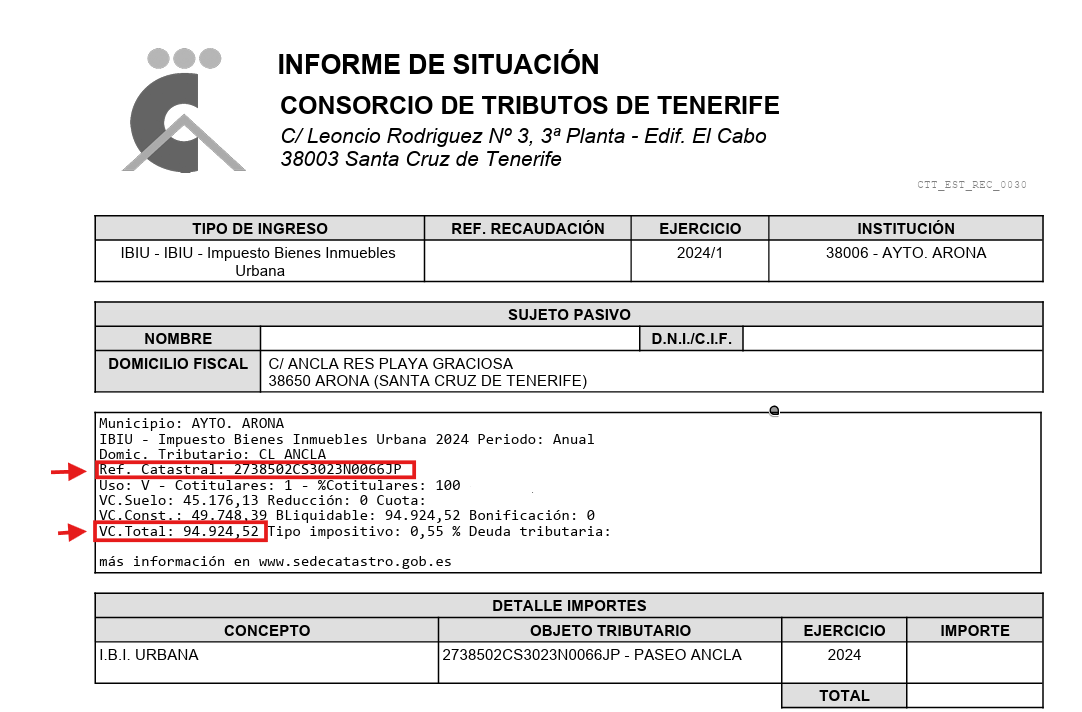
When you open the receipt, look for the field: Valor catastral.
This is your cadastral value and is one of the key pieces of information required to complete your Form 210.
Why your IBI receipt is important
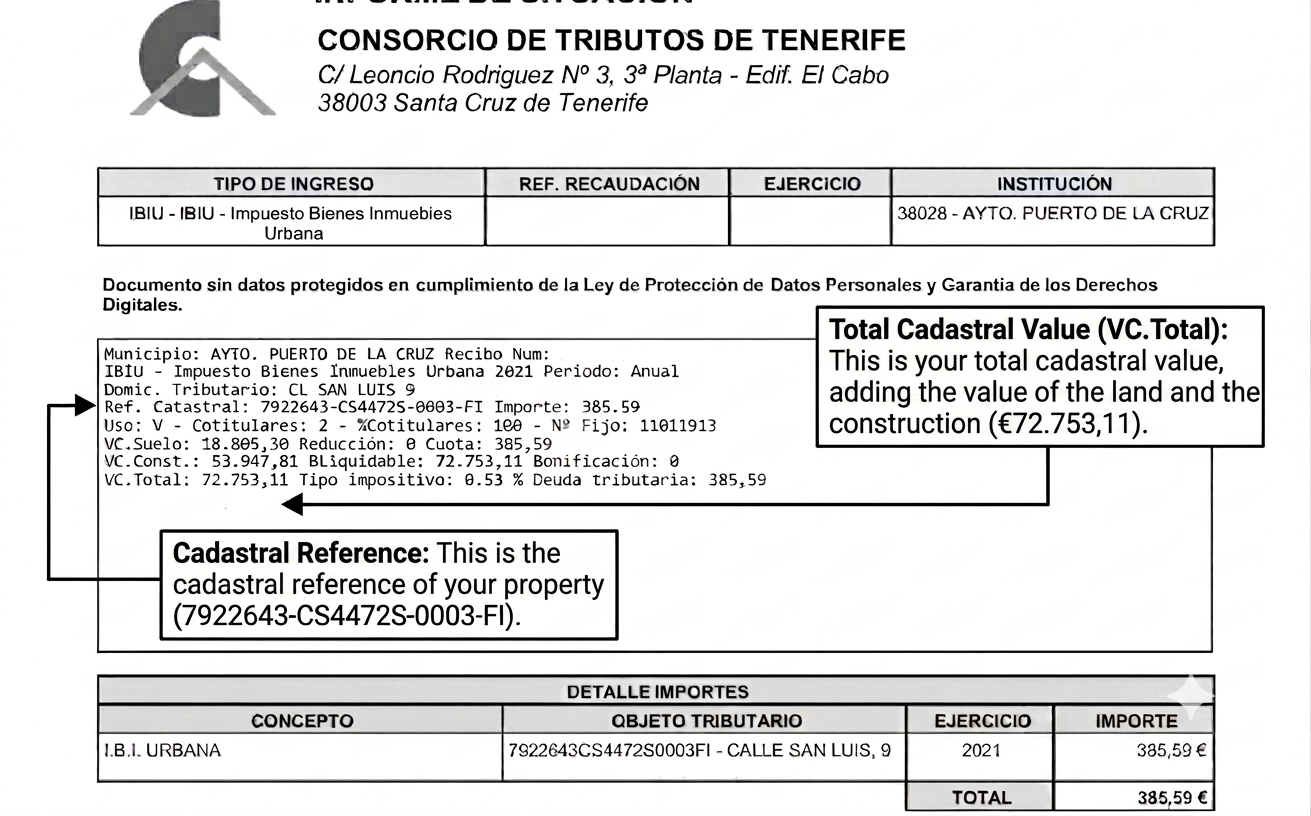
Your IBI tax receipt (Property Tax) contains important information about your property.
For non-resident owners, this document is particularly useful as it usually includes:
- The cadastral value.
- The cadastral reference.
- Basic details regarding the property and its taxation.
These details are often needed to prepare your Modelo 210 correctly.
For this reason, having your IBI receipt to hand can save time when completing the form and help to avoid errors in your tax return.
What is the Consorcio de Tributos de Tenerife?
The Consorcio de Tributos de Tenerife is the administrative body responsible for collecting local taxes in many municipalities on the island of Tenerife.
For property owners, this means that local taxes such as IBI (Council Tax) are often managed and collected through this institution rather than directly by the local council.
Some of the main municipalities in the Tenerife whose local taxes are managed by the Consorcio de Tributos de Tenerife include:
- Arafo
- Arico
- Arona
- Buenavista del Norte
- Candelaria
- El Rosario
- El Sauzal
- El Tanque
- Fasnia
- Garachico
- Guía de Isora
- Güímar
- Icod de los Vinos
- La Laguna
- La Matanza de Acentejo
- La Orotava
- La Victoria de Acentejo
- Los Realejos
- Los Silos
- Puerto de la Cruz
- San Juan de la Rambla
- San Miguel de Abona
- Santa Úrsula
- Santiago del Teide
- Tacoronte
- El Teide
Municipalities on other islands (Province of Santa Cruz de Tenerife)
- El Hierro: Valverde, La Frontera and El Pinar.
- La Palma: Villa de Mazo, Tazacorte and Puntallana
If your property is located in one of these municipalities, it is very likely that you will be able to access your IBI bill via the Consorcio de Tributos de Tenerife website.
How to download your IBI receipt in Tenerife
The Consorcio de Tributos de Tenerife does not usually send IBI receipts by post, especially when the tax is paid by direct debit.
However, in many cases, property owners can download the receipt online using the information shown on their bank statement.
To do this, you’ll need to have your bank statement to hand, showing the direct debit for your council tax payment.
Simplified download using your bank details
STEP 1. Find the CSV number on your bank statement.

STEP 2. Go to the simplified receipt download page here.
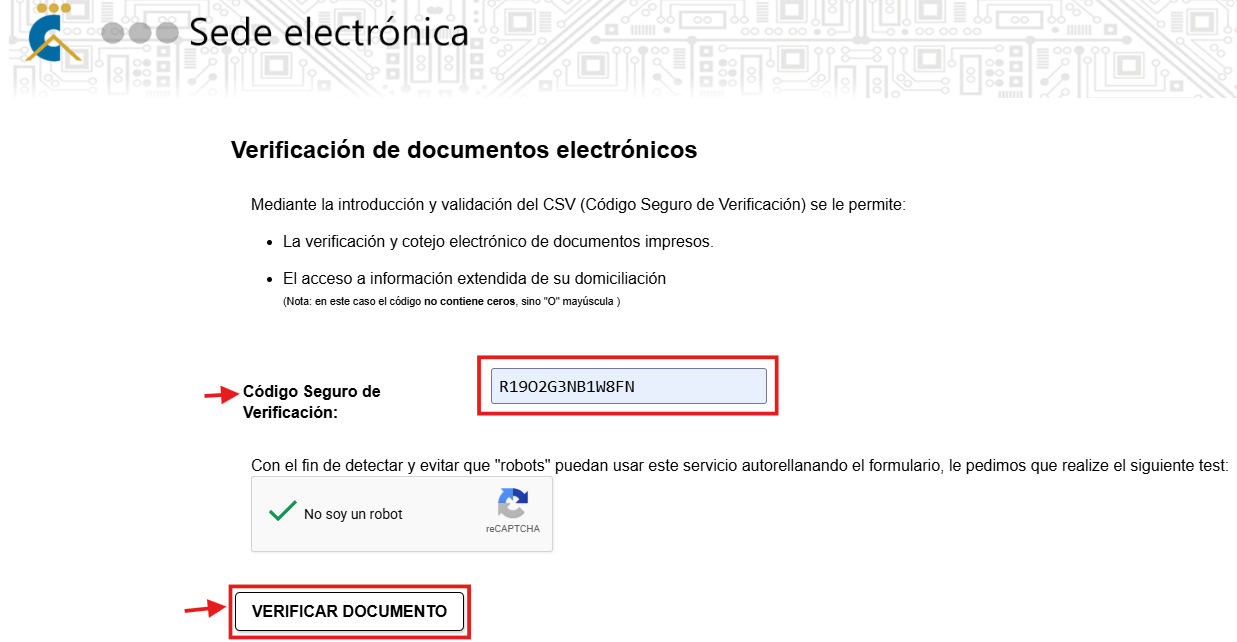
STEP 3. Enter the required information.
Enter the Secure Verification Code (CSV). Important: If your CSV code contains a 0, replace it with a capital ‘O’.
Next, select:
‘VERIFICAR DOCUMENTO’.
STEP 4. Log in to access your IBI receipt.
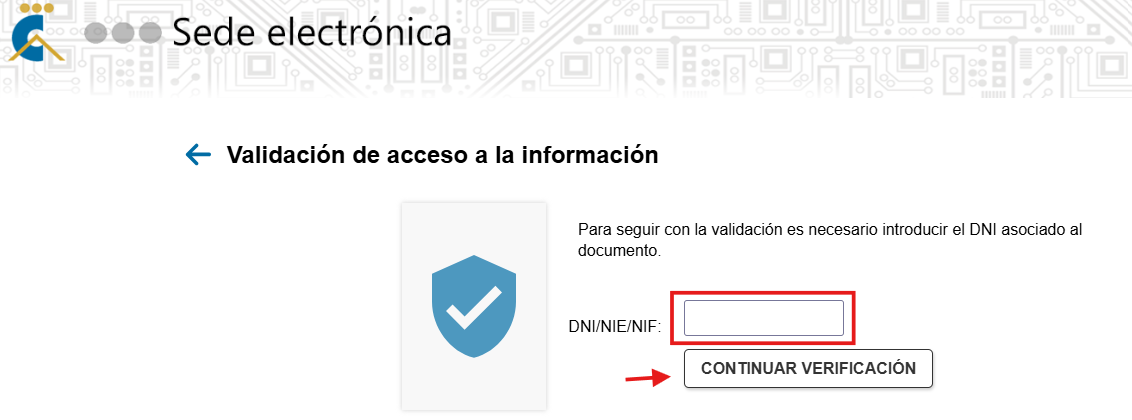
Before you can download the receipt to view your cadastral value, you must enter the DNI/NIE of the person named on the receipt.
STEP 5. Download the receipt.
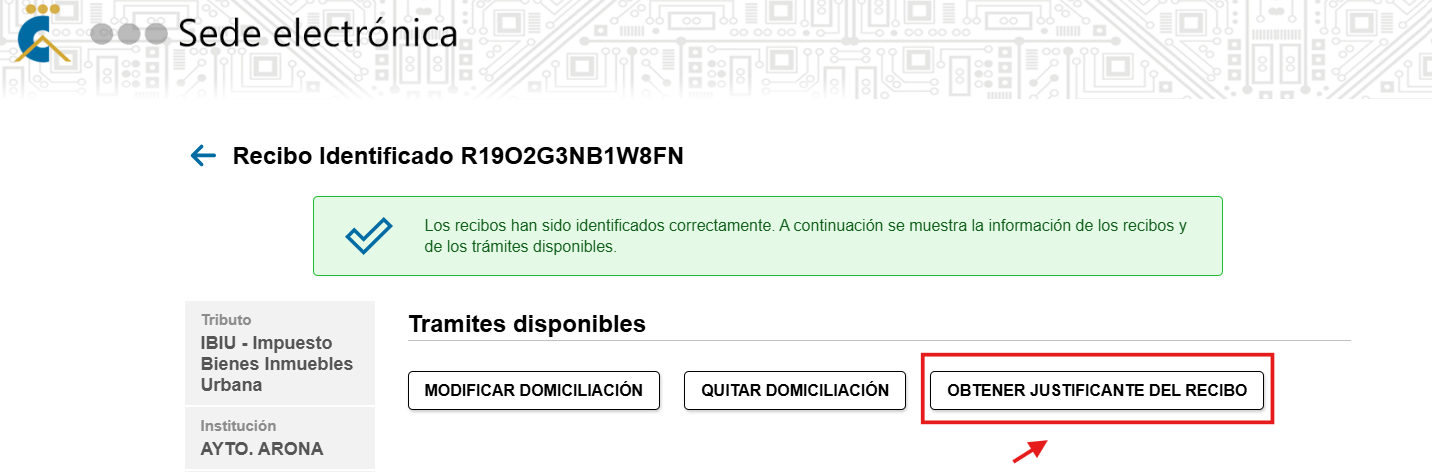
Once all the details have been entered correctly, the system will display a message confirming that your details are correct, and you will be presented with several options. From these, select:
‘OBTENER JUSTIFICANTE DEL RECIBO’.
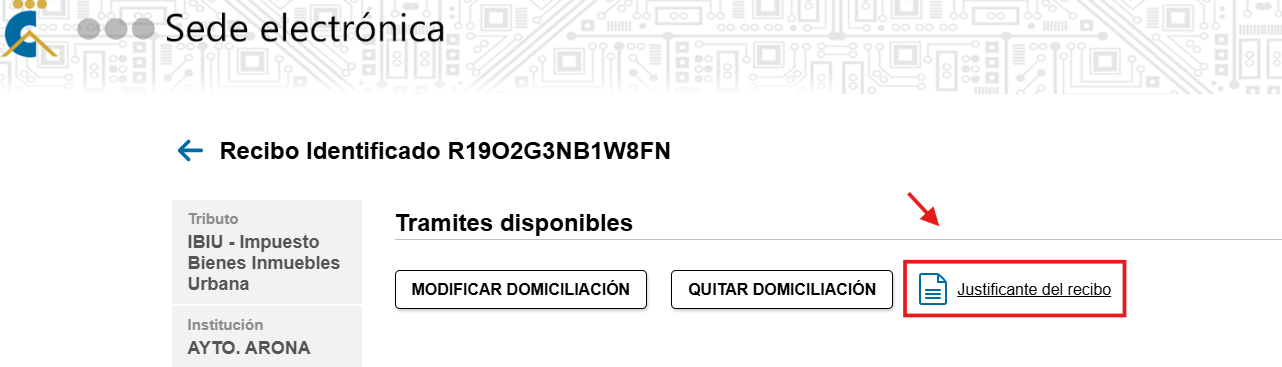
Next, click on the ‘Justificante del recibo’ section again.
Finally, the system will display your property tax receipt, where you will find both your cadastral value and its cadastral reference number – essential information for completing your Modelo 210.
Common questions
I already have the IBI receipt. Do I need anything else?
In many cases, no.
If your IBI receipt clearly shows the key property values, you may already have the information needed for your tax filing.
In some receipts, the cadastral value may appear as:
- Valor catastral.
- Base imponible or Base liquidable.
Depending on the format of the receipt, the wording may vary.
I have the receipt, but I do not know what I am looking at
Look for the section showing the property value.
In many cases, you will see:
- Valor catastral = cadastral value.
- Referencia catastral = cadastral reference.
However, on some IBI receipts, the cadastral value may instead appear as:
- Base imponible.
- Base liquidable.
If your receipt shows a breakdown between land and building values, please note that the cadastral value is the sum of:
- Valor catastral del suelo.
- Valor catastral de la construcción.
In other words:
Cadastral value = land cadastral value + building cadastral value.
This is important because some property owners only look at one of the two figures, when the correct cadastral value is the total of both.
I cannot find the IBI payment on my bank statement
Try checking:
- Older bank statements.
- The period when local property taxes are usually charged.
- Or entries shown under the local tax authority or the Consorcio de Tributos de Tenerife.
If the payment was made from another person’s account, you may need access to that bank statement instead.
I no longer have access to the bank account used for payment
If you no longer have access to the account details, downloading the receipt online may be more difficult.
If possible, check whether you still have:
- An old PDF copy of the receipt.
- A saved email with the document.
- Or previous property tax records.
Alternatively, you can find the cadastral value in your purchase deed (escritura de compraventa) and through the Catastro website (a digital certificate is needed).
Why this matters for non-resident taxes in Spain
In addition to Property Tax (IBI), non-residents who own a property in Spain may also need to file Modelo 210.
If the property is for personal use only, regardless of whether it is occupied or vacant during the year, you must file Modelo 210 for imputed income.
This tax must be declared by 31 December of the year following the tax year.
If you rent out your property, you must file Modelo 210 for rental income.
In that case, the return must be filed between 1 and 20 April of the following year.
This is one of the reasons why the IBI receipt is so important: it helps you locate the cadastral value and other property details needed to prepare the tax return correctly.
File your Modelo 210 easily with IberianTax
At IberianTax, we have simplified the filing of Form 210 with the Spanish tax authorities, with prices starting from €34.95.
Our online platform allows you to prepare and file the following:
You simply complete the questionnaire with step-by-step guidance, and we then review your submission and file it with the authorities for you.
If you already have your IBI receipt, you are one step closer to completing your tax return correctly.
Start your Modelo 210 filing with IberianTax today.