How to find your cadastral value and download your IBI receipt in Murcia
September 24, 2026
If you own a property in Murcia and need to file your non-resident tax return in Spain (Form 210), one of the most important details you will usually need is the cadastral value of your property. In most cases, the simplest way to find this information is on your IBI receipt (Property Tax). This guide explains:
- Where to locate the cadastral value on your IBI receipt.
- How to download your IBI receipt in Murcia.
- Why this document is essential for completing your non-resident tax return correctly.
Where to find your cadastral value in Murcia
If you already have your IBI receipt, check it first before trying to download a new copy. In most cases, the document already contains the information you need.
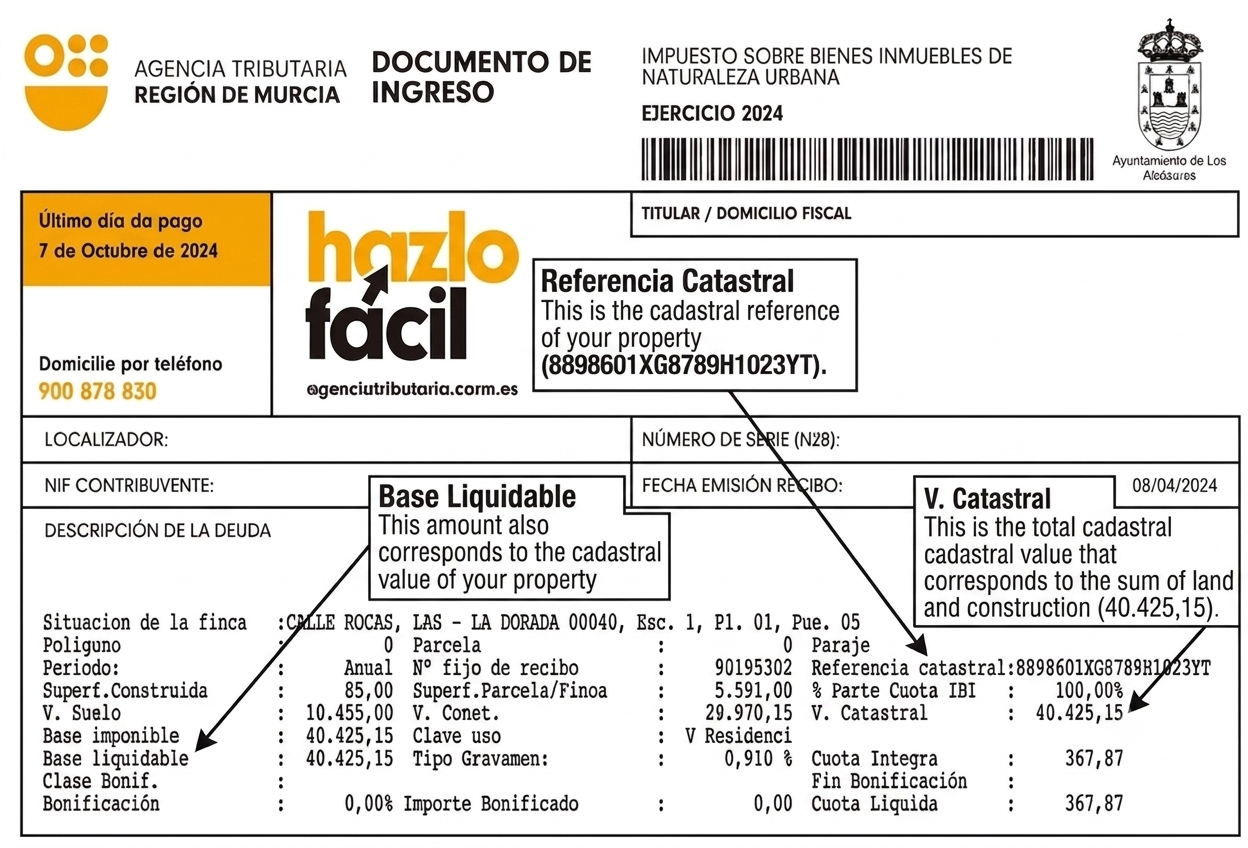
When you open the receipt, look for the field: Valor catastral.
This is your cadastral value and is one of the key pieces of information required to complete your Form 210.
Why your IBI receipt is important
Your IBI tax receipt (Property Tax) contains important information about your property.
For non-resident owners, this document is particularly useful as it usually includes:
- The cadastral value.
- The cadastral reference.
- Basic details regarding the property and its taxation.
These details are often needed to prepare your Modelo 210 correctly.
For this reason, having your IBI receipt to hand can save time when completing the form and help to avoid errors in your tax return.
What is the Agencia Tributaria de la Región de Murcia (ATRM)?
The Tax Agency of the Region of Murcia (ATRM) is the administrative body responsible for collecting local taxes in many municipalities in the province of Murcia.
For property owners, this means that local taxes such as IBI (Council Tax) are often managed and collected through this institution rather than directly by the local council.
Some of the main municipalities in the Murcia region whose local taxes are managed by the ATRM include:
- Abanilla
- Abarán
- Águilas
- Albudeite
- Beniel
- Blanca
- Bullas
- Calasparra
- Campos del Río
- Caravaca de la Cruz
- Cehegín
- Fortuna
- Fuente Álamo
- Jumilla
- La Unión
- Las Torres de Cotillas
- Librilla
- Los Alcázares
- Mazarrón
- Molina de Segura
- Moratalla
- Mula
- Puerto Lumbreras
- San Pedro del Pinatar
- Santomera
- Yecla
If your property is in one of these municipalities, there is a good chance that your IBI receipt can be accessed through the ATRM system.
How to download your IBI receipt in Murcia
The Tax Agency in Murcia does not usually send IBI receipts by post, especially when the tax is paid by direct debit.
However, in many cases, property owners can download the receipt online using the information shown on their bank statement.
There are two ways to find out the cadastral value using the information on the payment slip.
For both options, you will need to have your bank statement to hand, showing the direct debit for the IBI payment.
Option 1: Simplified download using your bank details
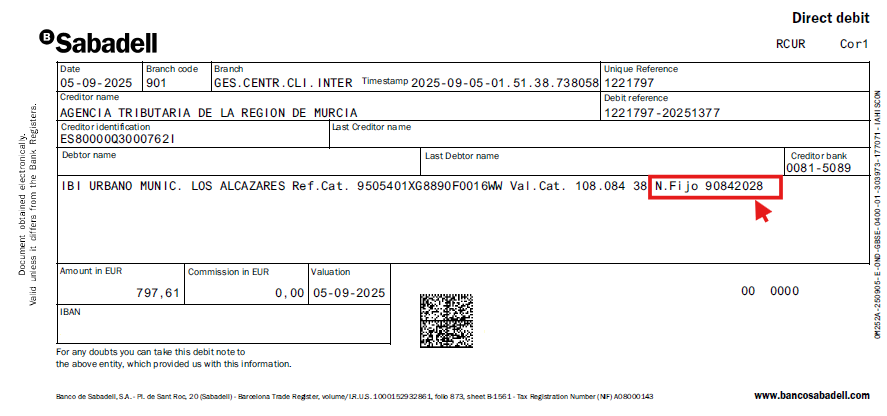
STEP 1. Find the reference number (numero fijo) for the payment on your bank statement.
STEP 2. Go to the simplified receipt download page here.
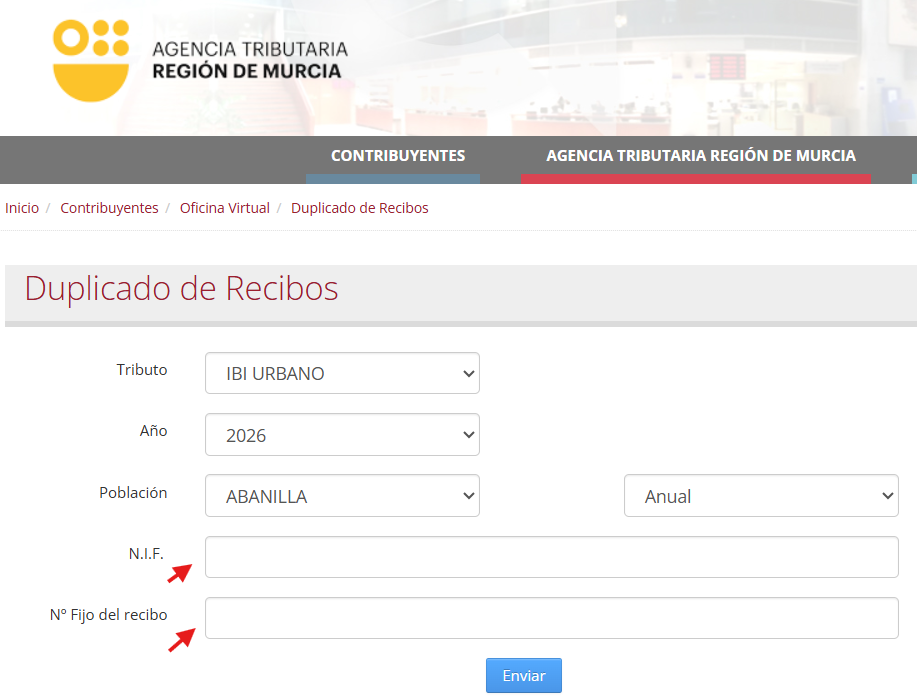
STEP 3. Enter the required information.
From the drop-down menu labelled ‘Tributo’, select the option:
‘IBI URBANO’.
Next, select:
- The year corresponding to the receipt you wish to download.
- The town where your property is located.
Important: If the town where your property is situated does not appear on the list, this means that the Property Tax (IBI) is not administered by the Murcia Regional Tax Agency, but directly by the relevant local council. In that case, you will need to obtain the tax notice via the council’s online portal or from its offices.
Complete the required fields by entering:
- The NIF or NIE of the bill holder.
- The fixed reference number (numero fijo) of the bill, which appears on your bank statement.
Finally, click ‘Enviar’.
STEP 4. Download the bill.
Once all the details have been entered correctly, the system should display the invoice details and allow you to download the bill, as shown below:
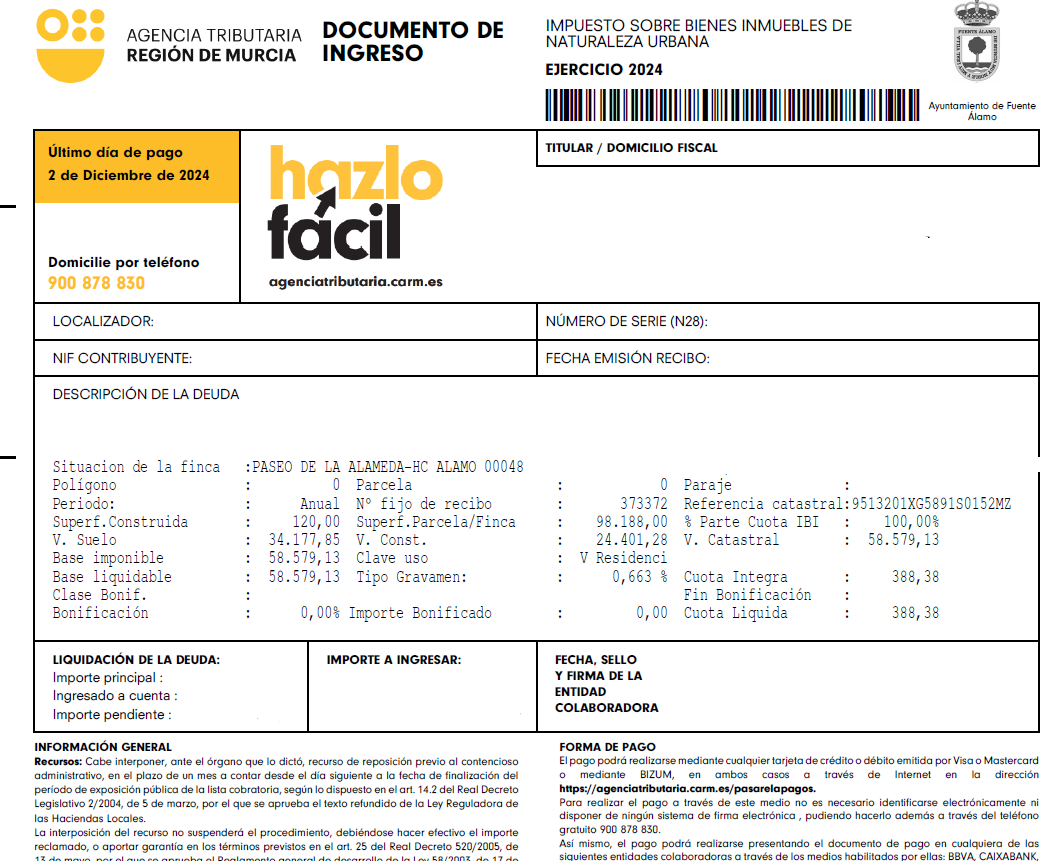
Option 2: Check the details directly on your bank statement
In many cases, it is not necessary to visit the Murcia Regional Tax Agency’s website, as the bank statement for the IBI payment itself shows the necessary information.
Check the entry relating to the IBI payment. If the statement includes the following details, you can obtain the information directly:
- Ref. Cat: corresponds to the property’s cadastral reference. It consists of 20 alphanumeric characters.
- Val. Cat: corresponds to the property’s cadastral value.
If these details appear on the statement, you already have the necessary information and will not need to make any further enquiries via the Murcia Regional Tax Agency’s online portal.
The following example shows a bank statement in which:
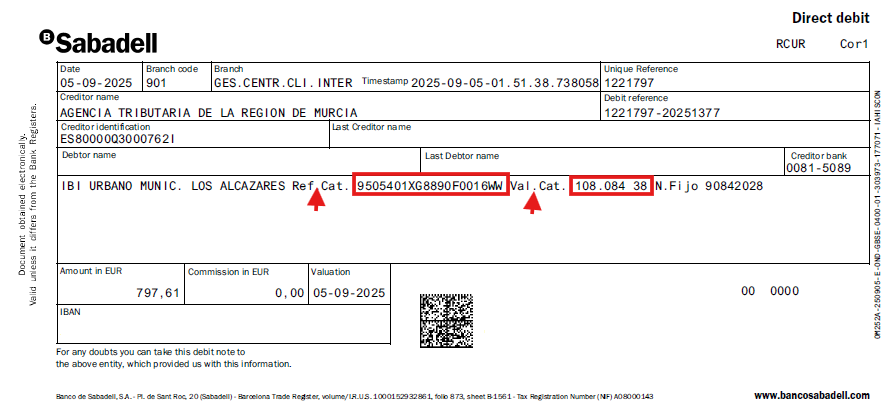
The cadastral reference is identified by the abbreviation ‘Ref. Cat.’ → 9505401XG8890F00116WW
The cadastral value is identified by the abbreviation ‘Val. Cat.’ → 108084.38
Thanks to this information, it is possible to find out both figures quickly and easily using only the bank statement for the IBI payment.
Which option should you try first?
If the cadastral reference and cadastral value already appear on the IBI payment receipt or bank statement, we recommend checking these first, as this is the quickest and easiest way to obtain this information, without needing to access the Virtual Office.
If this information does not appear on the receipt or bank statement, you will need to use Option 1, which will allow you to access the Murcia Regional Tax Agency’s Virtual Office by entering the requested details to view and download your IBI receipt and thus obtain the cadastral value.
How to obtain the cadastral value in municipalities in the Region of Murcia not administered by the ATRM
If your property is located in a municipality where the IBI is not administered by the Tax Agency of the Region of Murcia (ATRM) – such as Murcia or Cartagena – you can also obtain a copy of your IBI receipt by following the instructions below.
However, before attempting to download a new copy of the notice, we recommend that you check whether you already have one. In most cases, the IBI notice itself contains all the information required to submit Form 210.
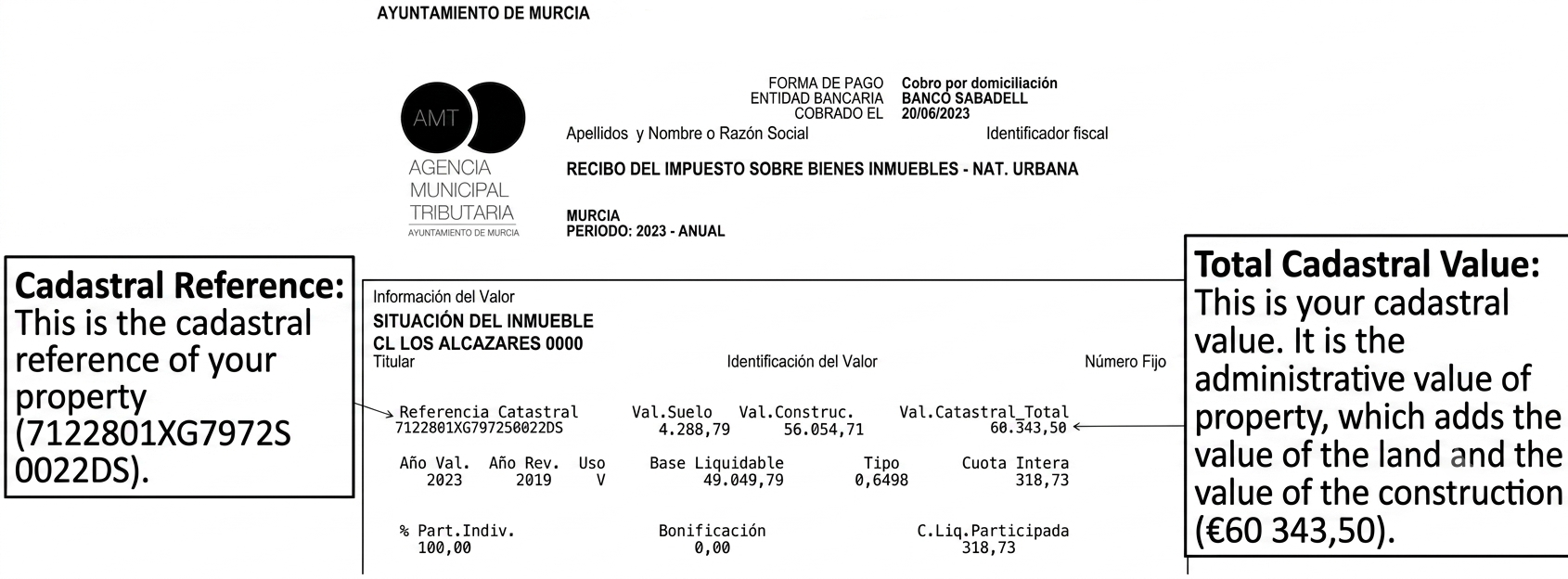
Once you have opened the receipt, look for the section marked ‘Cadastral value’. The amount shown in this field corresponds to the cadastral value of your property, which is one of the essential pieces of information required to complete Form 210 correctly.
We also recommend that you check whether the receipt includes the cadastral reference, as this information will also be required when submitting the tax return.
Murcia
If your property is located in the city of Murcia, you can obtain a copy of your IBI bill by following the steps below.
STEP 1. Access the Murcia Virtual Office here.
STEP 2. Scroll down to the ‘Requests’ section and click on:
‘Check the bill charged to my account’
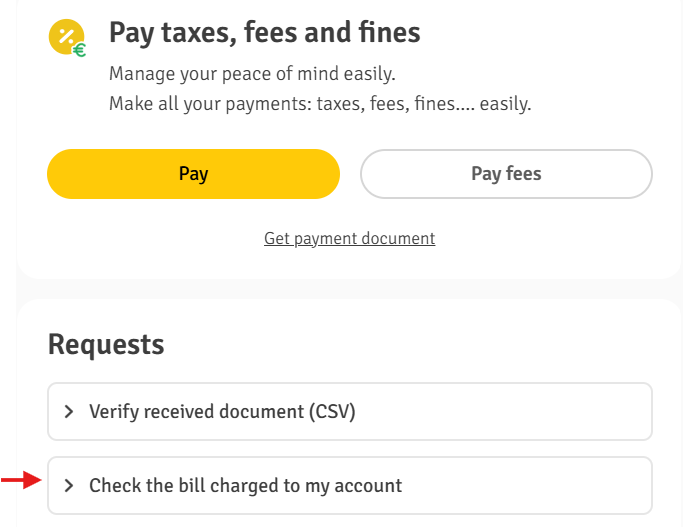
STEP 3. Enter the NIE of of the bill holder.
The system will ask you to enter the NIE of the bill holder.
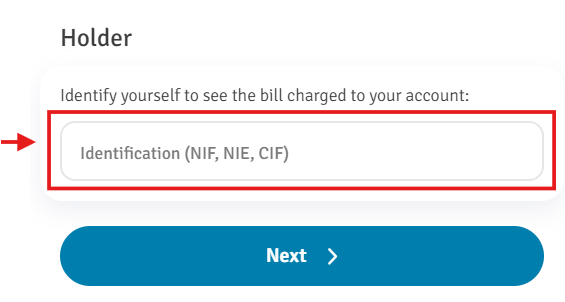
STEP 4. Select the type of bill.
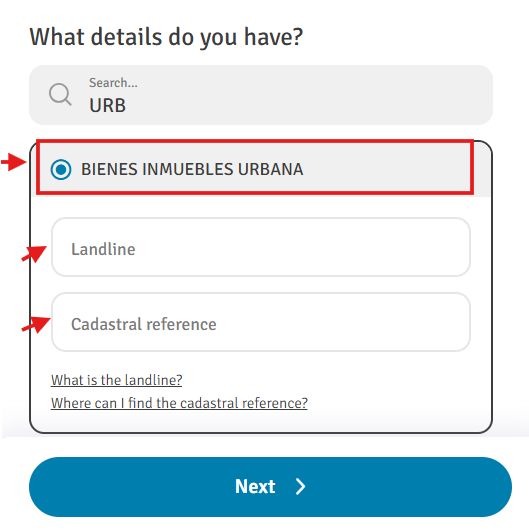
Once you have entered your NIE, the system will ask you for the bill details.
At this point, select:
‘BIENES INMUEBLES URBANA’
You will then need to enter:
- The fixed reference number or debit reference of the receipt.
- The cadastral reference.
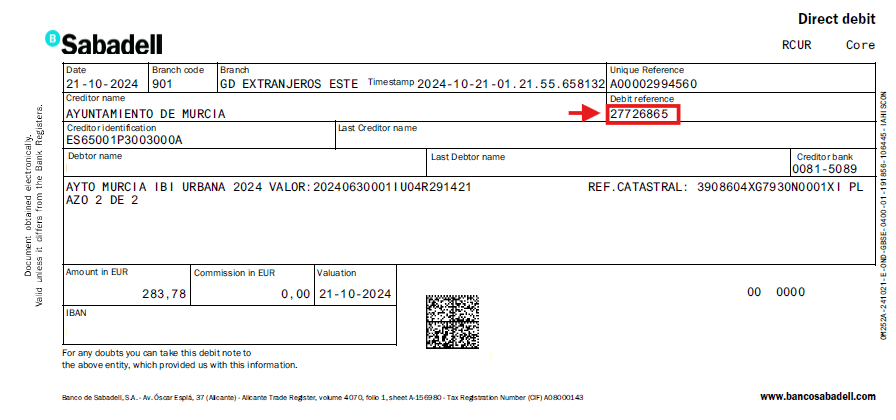
Important: Where can I find the fixed reference number on my bank statement?
The fixed reference number or debit reference usually appears on the bank statement, within the details of the IBI charge.
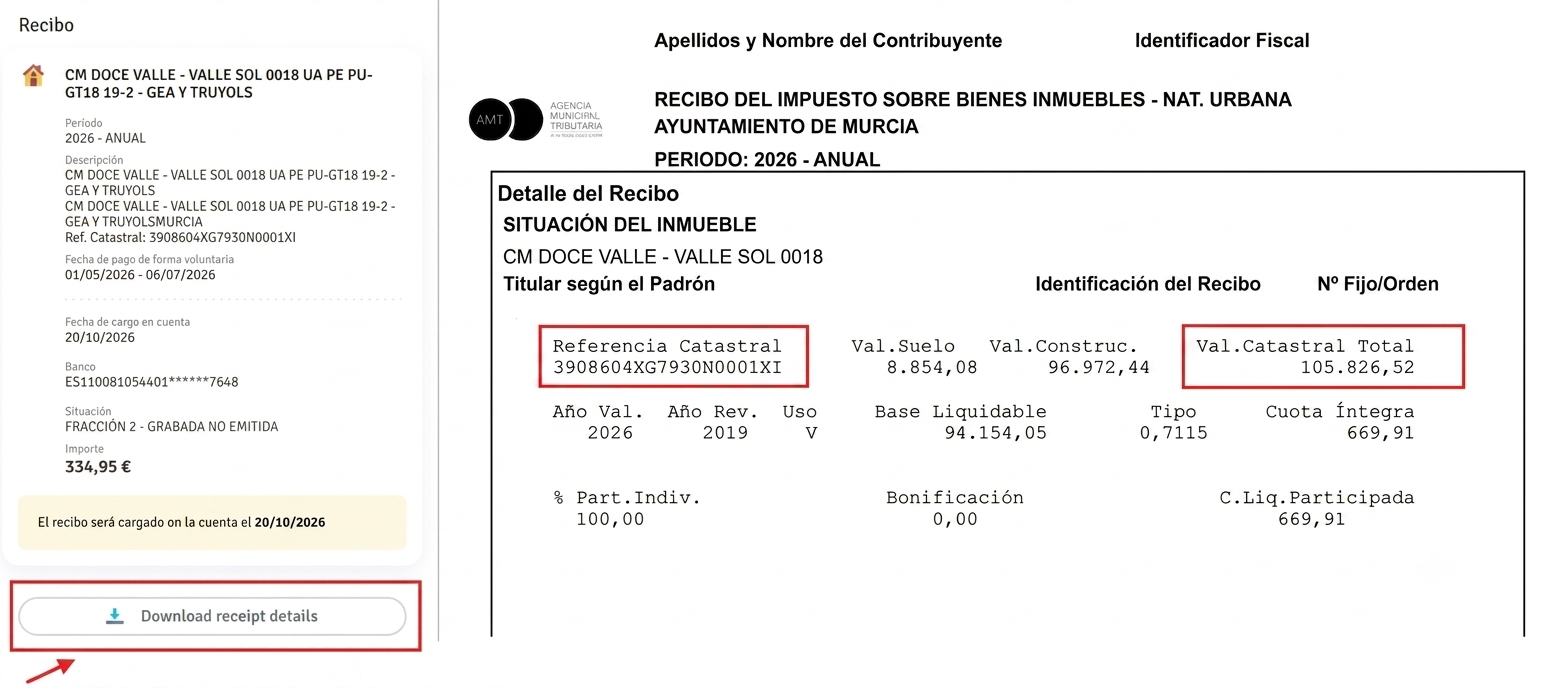
STEP 5. Download the receipt.
Once all the details have been entered correctly, the system should display the receipt details and allow you to download the receipt.
Cartagena
If your property is located in Cartagena, you can find out its cadastral value by checking your IBI payment statement, which contains the necessary information.
- RC: corresponds to the property’s cadastral reference. It consists of 20 alphanumeric characters.
- BL: corresponds to the property’s cadastral value.
If these details appear on the statement, you already have the information required to submit your Form 210.
The following example shows a bank statement in which:
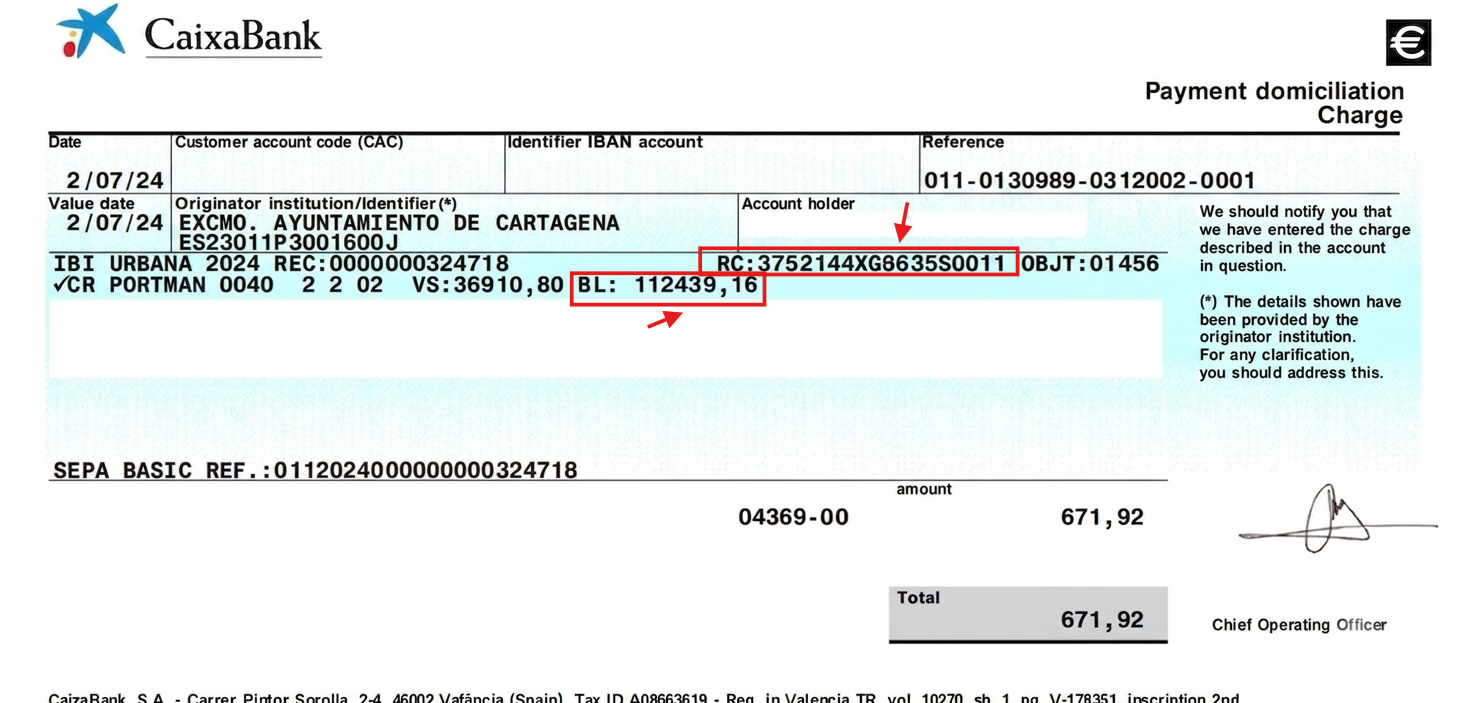
The cadastral reference is identified by the initials ‘RC’. → 3752144XG8635S0011
The cadastral value is identified by the initials ‘BL’. → 112439.16
Thanks to this information, it is possible to find out both figures quickly and easily using only the bank statement for the IBI payment.
Common questions
I already have the IBI receipt. Do I need anything else?
In many cases, no.
If your IBI receipt clearly shows the key property values, you may already have the information needed for your tax filing.
In some receipts, the cadastral value may appear as:
- Valor catastral.
- Base imponible or Base liquidable.
Depending on the format of the receipt, the wording may vary.
I have the receipt, but I do not know what I am looking at
Look for the section showing the property value.
In many cases, you will see:
- Valor catastral = cadastral value.
- Referencia catastral = cadastral reference.
However, on some IBI receipts, the cadastral value may instead appear as:
- Base imponible.
- Base liquidable.
If your receipt shows a breakdown between land and building values, please note that the cadastral value is the sum of:
- Valor catastral del suelo.
- Valor catastral de la construcción.
In other words:
Cadastral value = land cadastral value + building cadastral value.
This is important because some property owners only look at one of the two figures, when the correct cadastral value is the total of both.
I cannot find the IBI payment on my bank statement
Try checking:
- Older bank statements.
- The period when local property taxes are usually charged.
- Or entries shown under the local tax authority or Tax Agency of the Region of Murcia.
If the payment was made from another person’s account, you may need access to that bank statement instead.
I no longer have access to the bank account used for payment
If you no longer have access to the account details, downloading the receipt online may be more difficult.
If possible, check whether you still have:
- An old PDF copy of the receipt.
- A saved email with the document.
- Or previous property tax records.
Alternatively, you can find the cadastral value in your purchase deed (escritura de compraventa) and through the Catastro website (a digital certificate is needed).
Why this matters for non-resident taxes in Spain
In addition to Property Tax (IBI), non-residents who own a property in Spain may also need to file Modelo 210.
If the property is for personal use only, regardless of whether it is occupied or vacant during the year, you must file Modelo 210 for imputed income.
This tax must be declared by 31 December of the year following the tax year.
If you rent out your property, you must file Modelo 210 for rental income.
In that case, the return must be filed between 1 and 20 April of the following year.
This is one of the reasons why the IBI receipt is so important: it helps you locate the cadastral value and other property details needed to prepare the tax return correctly.
File your Modelo 210 easily with IberianTax
At IberianTax, we have simplified the filing of Form 210 with the Spanish tax authorities, with prices starting from €34.95.
Our online platform allows you to prepare and file both:
You simply complete the questionnaire with step-by-step guidance, and we then review your submission and file it with the authorities for you.
If you already have your IBI receipt, you are one step closer to completing your tax return correctly.
Start your Modelo 210 filing with IberianTax today.