How to find your cadastral value and download your IBI receipt in Alicante
May 7, 2026
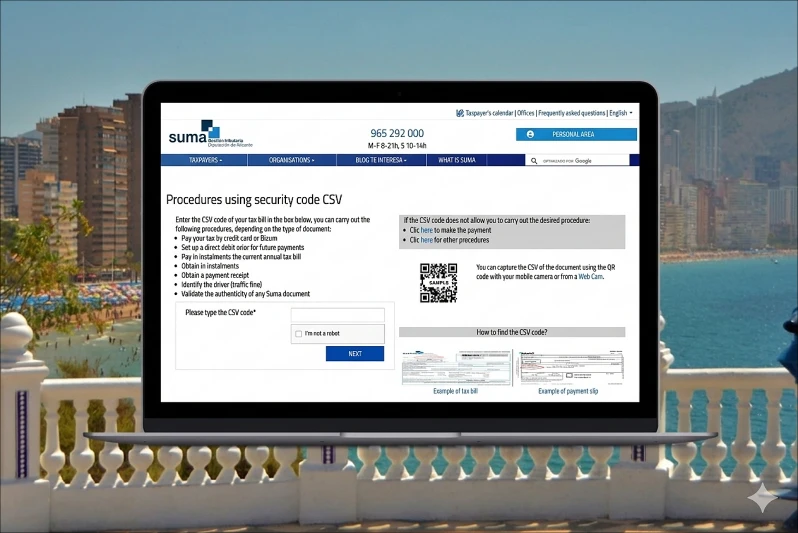
If you own a property in the Alicante and need to file your non-resident tax return in Spain (Form 210), one of the most important details you will usually need is the cadastral value of your property. In most cases, the simplest way to find this information is on your IBI receipt (Property Tax). This guide explains:
- Where to locate the cadastral value on your IBI receipt.
- How to download your IBI receipt in Alicante.
- Why this document is essential for completing your non-resident tax return correctly.
Where to find your cadastral value in Alicante (SUMA)
If you already have your IBI receipt, check it first before trying to download a new copy. In most cases, the document already contains the information you need.
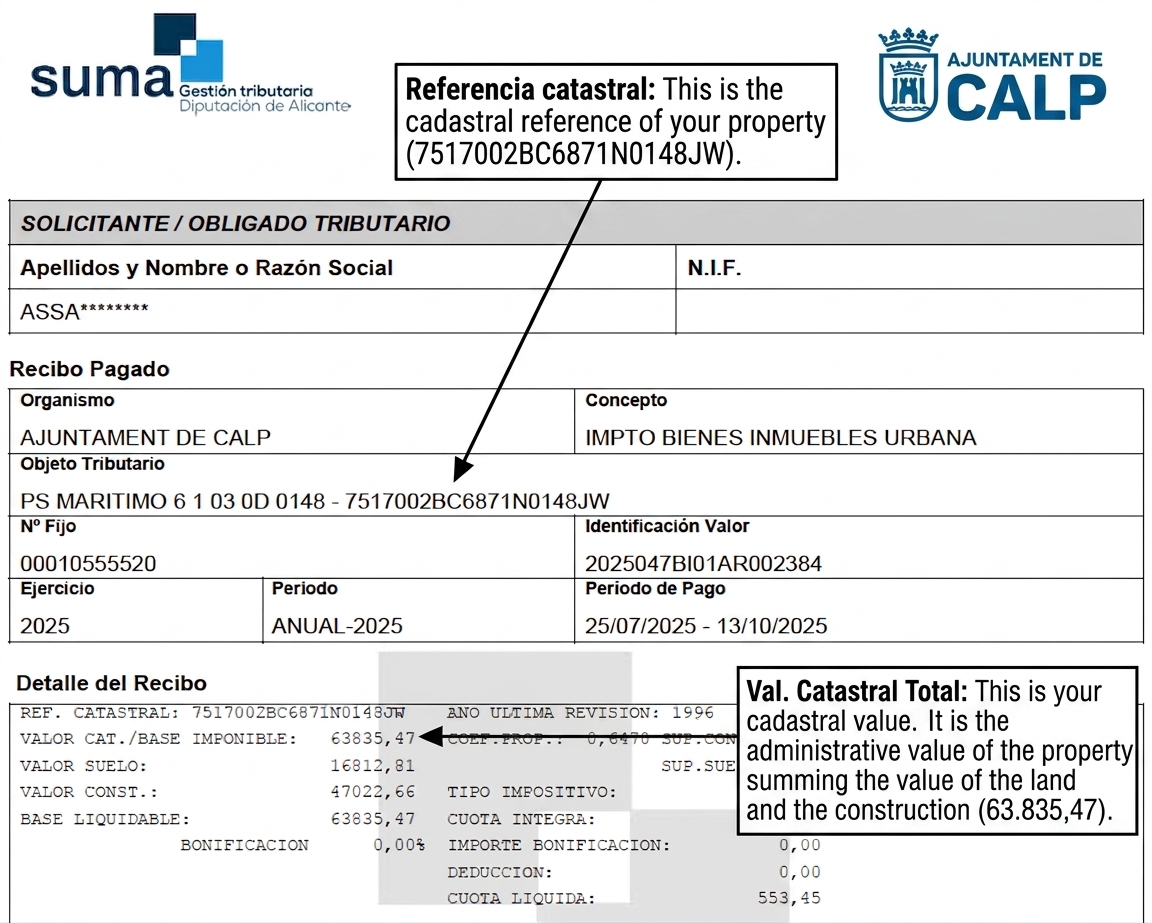
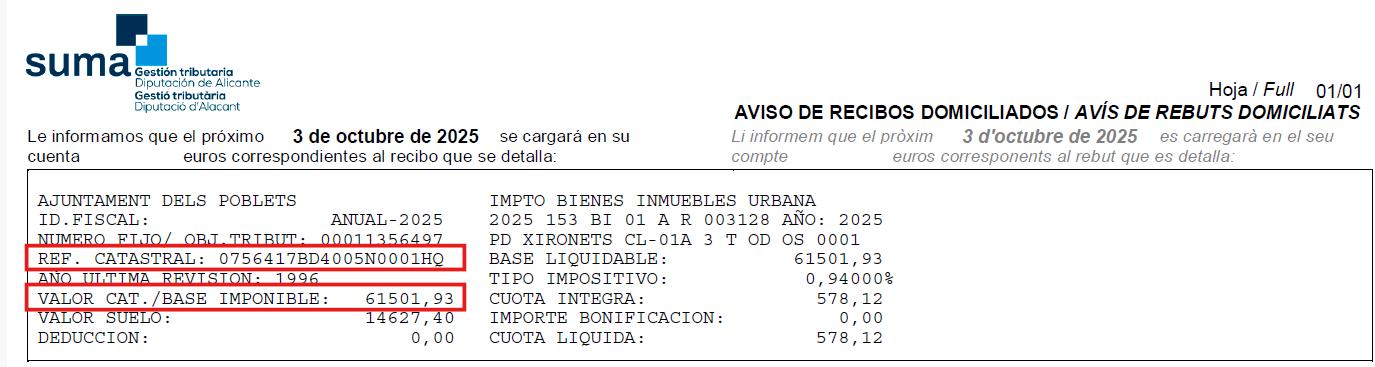
When you open the receipt, look for the field: Valor catastral.
This is the official cadastral value of your property and is one of the key pieces of information required to complete your Modelo 210.
Why your IBI receipt is important
Your IBI tax receipt (Property Tax) contains important information about your property.
For non-resident owners, this document is particularly useful as it usually includes:
- The cadastral value.
- The cadastral reference.
- Basic details regarding the property and its taxation.
These details are often needed to prepare your Modelo 210 correctly.
For this reason, having your IBI receipt to hand can save time when completing the form and help to avoid errors in your tax return.
What is SUMA?
SUMA Gestión Tributaria is an autonomous body created by the Provincial Council of Alicante, whose main functions are to manage and collect municipal taxes in the province of Alicante.
For property owners, this means that taxes such as IBI (Property Tax), waste collection fees, and other municipal charges are often managed and collected through SUMA rather than directly by each town hall.
Municipalities served by SUMA
SUMA collaborates with a large number of municipalities across the province of Alicante, managing the collection of most local taxes, including the IBI (Property Tax). In general, it provides services to almost all municipalities in the province, with the exception of the city of Alicante and Xàbia.
The municipalities in which SUMA manages and collects taxes include, amongst others:
Benidorm
Calpe (Calp)
Altea
Villajoyosa (La Vila Joiosa)
Dénia
Torrevieja
Santa Pola
El Campello
Guardamar del Segura
Orihuela
Pilar de la Horadada
La Nucía
Finestrat
Alfaz del Pi (l’Alfàs del Pi)
San Vicente del Raspeig
Mutxamel
Sant Joan d’Alacant
In this post, we will explain how to download the IBI receipt to obtain this information through the SUMA website.
How to download your IBI receipt in Alicante
The SUMA does not usually send IBI receipts by post, especially when the tax is paid by direct debit.
However, in many cases, property owners can download the receipt online using the information shown on their bank statement.
To download your IBI receipt, you will need to have your bank statement to hand, showing the direct debit for the IBI payment.
Below, we explain in detail how to download your property tax bill from the SUMA using your bank statement:
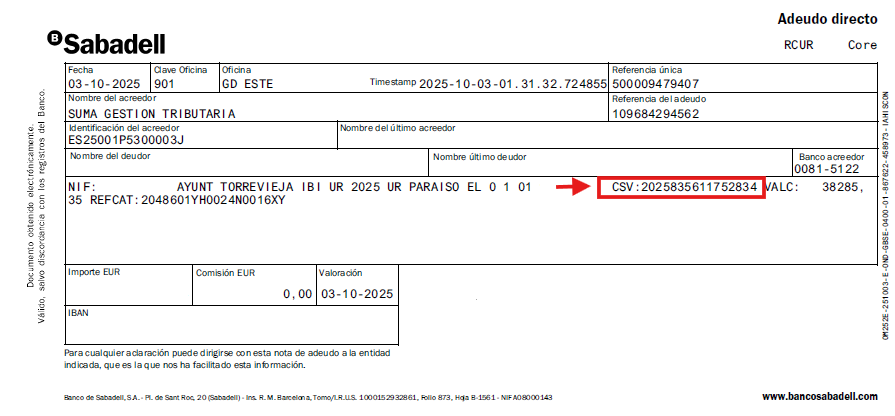
STEP 1. Find the “CSV” (Secure Verification Code) on your bank statement.
First of all, you will need to identify the “CSV” code. This code serves as a unique identifier for your IBI receipt.
STEP 2. Go to the SUMA website here.
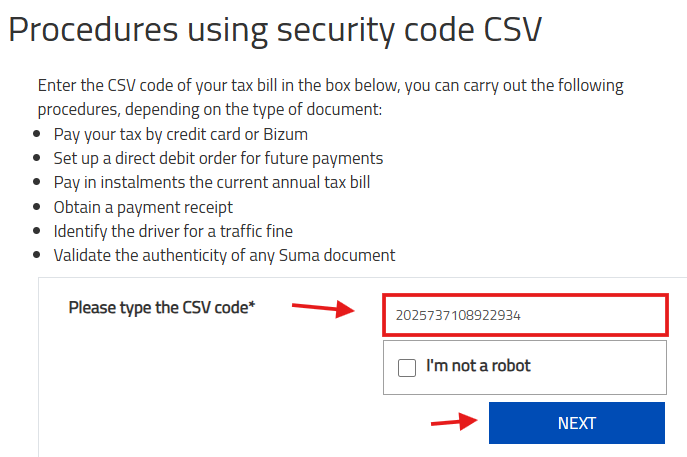
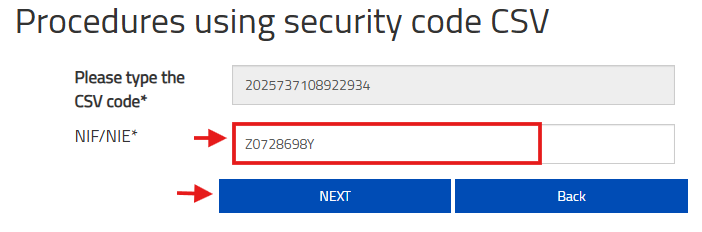
STEP 3. Enter the CSV code and click “Next”.
Enter the CSV code from your bank statement in the corresponding field on the SUMA website, then click “Next”.
STEP 4. Then enter your NIE (tax identification number) and click “Next”.
STEP 5. Proceed to download your IBI receipt by clicking the “Download” button.

STEP 6. Once downloaded, you can access the necessary data from the receipt, such as the cadastral value and reference for completing the Imputed Income form (Modelo 210).
Common questions
I already have the IBI receipt. Do I need anything else?
In many cases, no.
If your IBI receipt clearly shows the key property values, you already have the information needed to complete your tax return.
The most important figure to locate is the cadastral value, which may appear as:
- Valor catastral
- Base imponible or Base liquidable.
The terminology may vary depending on the format of the receipt.
I have the receipt, but I do not know what I am looking at
Look for the section showing the property value.
Focus on these two key elements:
Valor catastral = cadastral value.
Referencia catastral = cadastral reference.
These are the main fields required for Modelo 210.
In some receipts, the cadastral value may not appear explicitly as “Valor catastral”, and instead be shown as:
- Base imponible.
- Base liquidable.
If your receipt shows a breakdown between land and building values, please note that the cadastral value is the sum of:
- Valor catastral del suelo.
- Valor catastral de la construcción.
In other words:
Cadastral value = land cadastral value + building cadastral value.
It is important to use the total, as some owners mistakenly use only one of the two figures.
I cannot find the IBI payment on my bank statement
Try checking:
- Older bank statements.
- The period when local property taxes are usually charged.
- Or entries shown under the local tax authority or SUMA.
If the payment was made from another account (e.g. a partner or previous owner), you may need access to that statement instead.
I no longer have access to the bank account used for payment
In this case, downloading the receipt online may not be possible using the CSV method.
If possible, check whether you still have:
- An old PDF copy of the receipt.
- A saved email with the document.
- Or previous property tax records.
Alternatively, you can find the cadastral value in your purchase deed (Escritura) and through the Catastro website (a digital certificate is needed).
Why this matters for non-resident taxes in Spain
In addition to Property Tax (IBI), non-residents who own a property in Spain may also need to file Form 210.
1. Property not rented (imputed income)
If the property is for personal use only, regardless of whether it is occupied or vacant during the year, you must file Form 210 for imputed income.
This tax must be declared by 31 December of the year following the tax year.
2. Property rented
If you rent out your property, you must file Form 210 for rental income.
In that case, the return must be filed between 1 and 20 January of the following year.
This is one of the reasons why the IBI receipt is so important: it helps you locate the cadastral value and other property details needed to prepare the tax return correctly.
File your Modelo 210 easily with IberianTax
At IberianTax, we have simplified the filing of Form 210 with the Spanish tax authorities, with prices starting from €34.95.
Our online platform allows you to prepare and file both:
- Imputed Income Tax return.
- Rental Income Tax return.
- Capital Gains Tax return.
You simply complete the questionnaire with step-by-step guidance, and we then review your submission and file it with the authorities for you.
If you already have your IBI receipt, you are one step closer to completing your tax return correctly.
Start your Modelo 210 filing with IberianTax today.